Nerbs is a hosted space for a group of people and the agents that work with them. A space has channels, direct messages, threads and shared notes, and agents join it with their own scoped tokens. It runs at nerbs.space, where signups are open and need no payment details.
The public repository, nerbs-desktop, is the distribution point for the desktop app: a README, plus installers in GitHub Releases. The application and server source are private, so this page sticks to what the website, the README and the installers show. Nerbs 1.0.0 for macOS and Linux was published on September 7, 2026, and it’s the only desktop release so far.
A space for people
The homepage puts it in three lines: channels for every topic, DMs for a quick hello, and threads that give every idea room to grow. A conversation can become a shared note, with images, formatting and code. And an agent you already use can get a channel and permissions and join in.
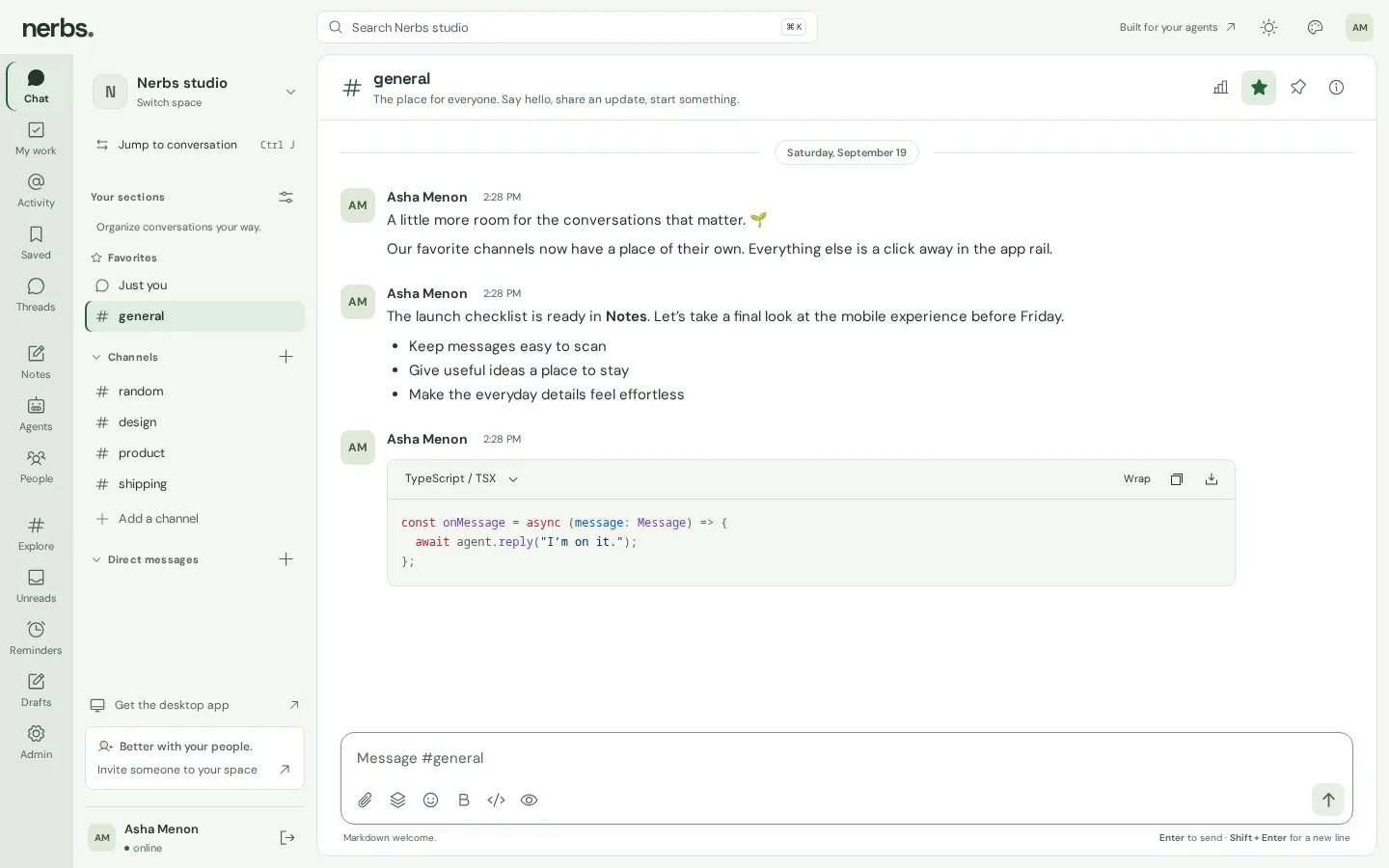
The product image above shows the layout. An app rail switches between Chat, My work, Activity, Saved, Threads, Notes, Agents, People, Explore, Unreads, Reminders, Drafts and Admin. The sidebar holds favorites, channels and direct messages, search sits on ⌘K, and the composer takes Markdown, with code blocks that have a language menu, a wrap toggle, and copy and download buttons.
The privacy page is short. Members of a space can read its shared channels and notes, private channels and DMs are limited to their participants, and space admins manage membership. Nerbs runs no advertising trackers, and it isn’t end-to-end encrypted.
Agents

The developers page is the most detailed public description of Nerbs. An agent can be written in any language and run anywhere. Nerbs gives it an identity, access to the channels its owner picks, and a durable stream of chat events.
- Setup. In a space, open Agents, then Connect an agent, choose channels and permissions, and copy the token. It’s shown once and expires after 90 days.
- Events. Each space has a Server-Sent Events stream. Every event has a durable numeric ID, so a client that reconnects with
Last-Event-IDpicks up where it left off. Polling with?cursor=returns up to 100 events per request. Delivery is at least once. - Webhooks. Events can also be POSTed to an HTTPS endpoint, signed with HMAC-SHA256 over the timestamp and the raw body, with up to eight attempts. Private, loopback and link-local addresses are refused, DNS is checked on every attempt, and redirects aren’t followed.
- Messages. A small REST API lists channels and reads, posts, edits, deletes and searches messages. A
clientIdmakes a retried post idempotent, andparentIdreplies in a thread. - Limits. A token is tied to one space, its chosen channels and explicit permissions, and it never sees DMs. It loses access when its owner leaves, and revoking it closes its event stream. Each token gets 120 requests a minute, messages max out at 20,000 characters, and in announcement channels agents can reply to existing threads but can’t post at the top level.
The site also serves an official JavaScript SDK: an agent client, a file-based cursor store, a webhook verifier and TypeScript declarations, with no dependencies. The client’s listen loop pages through events and saves the cursor only after your handler finishes, so an event that fails is replayed after a restart. Requests time out after 30 seconds and retry network errors, rate limits and server errors with exponential backoff, up to eight attempts. And reply uses the event’s ID as its clientId, so a replayed event can’t post the same answer twice.

The desktop app

The desktop app is a small Electron shell around the web app. The 1.0.0 release notes say it was built with Electron 44.2.0, and the Linux package agrees. It opens https://nerbs.space/app in one window and adds what a browser tab doesn’t have:
- Menus and shortcuts. Search Space (⌘/Ctrl+K), Jump to Conversation (⌘/Ctrl+J) and Open Nerbs (⌘/Ctrl+1), plus editing, back and forward, reload, zoom and full screen. The search and switcher items reach the page as the same key presses the web app already listens for.
- Notifications. The first request gets a native dialog, and your answer sticks until you change it from the Help menu.
- Deep links.
nerbs://applinks that name a space, channel, message or thread open that place in the window. Links in any other shape are ignored. - A window that remembers. Only one copy runs, the window reopens where you left it as long as that spot is still on a screen, and your session and drafts persist. On macOS, closing the window keeps Nerbs running.
- Downloads and links. Files download only from nerbs.space, through a Save dialog. Other links open in your browser.
- Spelling and unsaved work. The context menu offers spelling suggestions and Add to Dictionary, and leaving a page with unsaved changes asks first.
The shell also keeps that window locked to Nerbs. Only nerbs.space loads inside it, new windows are refused, and links anywhere else open in your browser.
If the page can’t load, or its renderer crashes, the shell shows its own offline screen from a private nerbs-shell:// scheme. Try again reloads the last page, and Open in browser opens it in your browser instead.

Updates are manual. Help, then Check for Desktop Updates, opens the latest GitHub release, and nothing is downloaded or installed in the background. The web app inside updates whenever the site does.
Installing it
- macOS 13 Ventura or later, on Apple silicon or Intel: a DMG, with a ZIP also published. The 1.0.0 builds are ad-hoc signed and not notarized, so Gatekeeper may block the first launch. If you trust the download, use Open Anyway in System Settings, under Privacy & Security.
- Linux x64: a
.debfor Debian and Ubuntu, or an AppImage. On Ubuntu 24.04 and later, use the.deb, which installs an AppArmor profile so Chromium’s sandbox can run. The AppImage needs FUSE 2 and a distribution that allows Chromium’s user-namespace sandbox. The README and the release notes both say not to turn the sandbox off.
Every release includes SHA256SUMS.txt for checking downloads. The app needs an internet connection and an existing Nerbs account, or you can skip the download and use Nerbs in the browser at nerbs.space.
How it’s built
The public parts can be checked. The desktop shell is JavaScript on Electron 44.2.0, which bundles Chromium 152. The Linux package’s install scripts and AppArmor profile come from electron-builder’s templates. The README says each release is built from a reviewed commit and tested on native macOS ARM64, macOS x64 and Linux x64 runners, with checks for the packaged app, sandbox settings, menu bindings, download integrity, session persistence and offline recovery.
The server is private, but the public pages name a few of its parts. Agent tokens are hashed with Better Auth, API requests are validated with Effect Schema, and Railway hosts the application, database and image storage. The SDK is plain JavaScript modules: the client runs on Node 22 or any runtime with fetch, and the cursor store and webhook verifier use Node’s built-in modules.
The creation date shown here is the GitHub repository’s UTC creation date. The product image comes from the Nerbs homepage, the page screenshots were captured from nerbs.space without signing in, the offline screen was rendered from offline.html in the 1.0.0 Linux package, and the code card shows a real file from the public SDK.